
The Complete Access & Identity Management Ecosystem
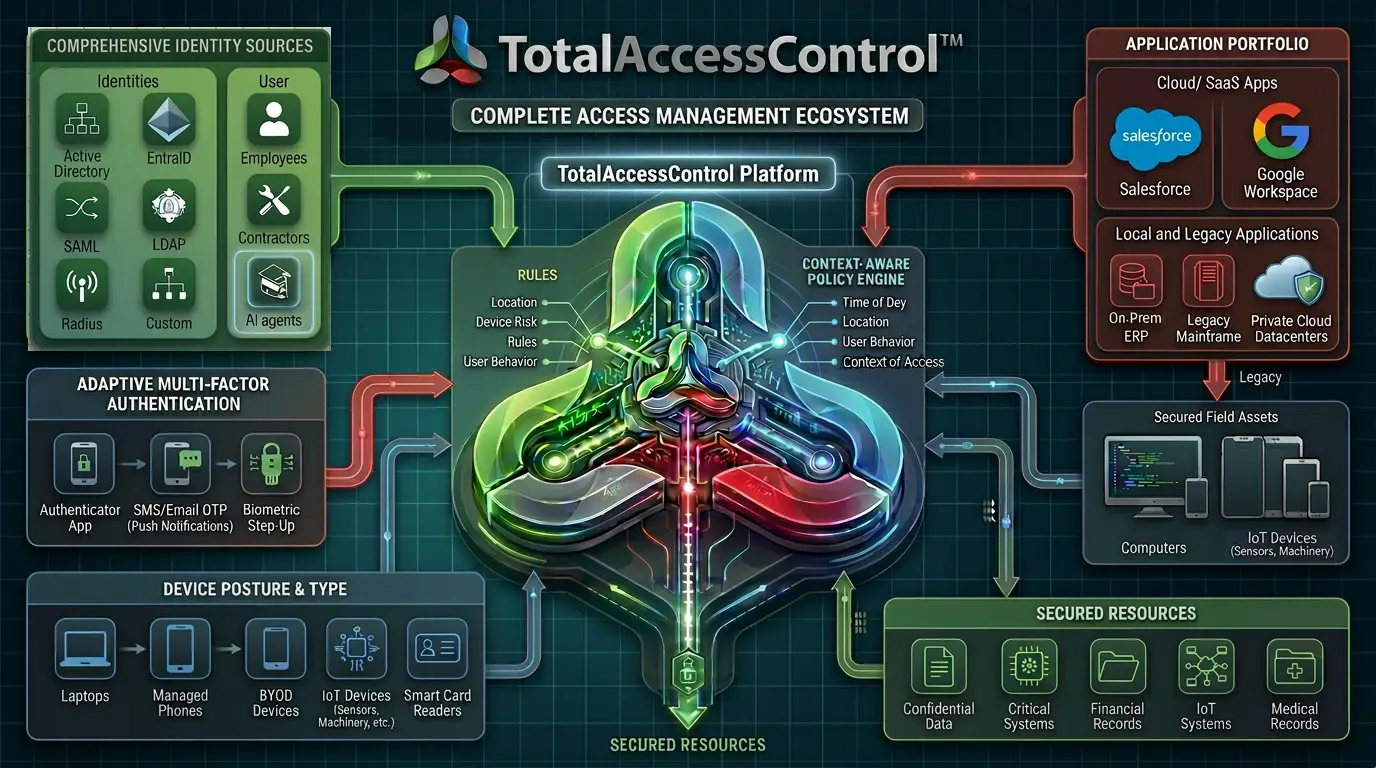
TAC sits at the center of your access control architecture — governing every identity, device, and application through a single policy-driven platform — with AI agents next.
Secure Virtual Appliance (SVA) Architecture
TAC is built on a single-tenant Secure Virtual Appliance that deploys as a reverse proxy between users and applications. Every customer gets a dedicated, isolated instance — no shared infrastructure, no noisy neighbors, no data co-mingling.
The SVA intercepts all access requests, evaluates identity, device posture, and policy compliance, and enforces access decisions before any traffic reaches the target application. All traffic flows through a single encrypted port (supporting up to TLS 1.3). All other inbound ports can be closed.
TAC scales from a single SVA to an array (multiple SVAs behind a load balancer for high availability) to a global array (SVAs distributed across worldwide locations for global enterprise deployments). All configurations are managed from a single admin console.
SVA Scaling Path
How Reverse-Proxy Enforcement Works
Unlike agent-based solutions that require software on every endpoint, or tunnel-based solutions that route traffic through a vendor’s cloud, TAC’s reverse proxy sits at the network edge and mediates every connection.
When a user requests access to an application:
Encrypted Request
The request hits TAC’s reverse proxy on a single encrypted port
Identity Evaluation
TAC evaluates the user’s identity against connected directories (AD, LDAP, SAML, RADIUS, OIDC, SQL, custom)
MFA Challenge
TAC challenges the user with the configured MFA method (FIDO2, SafeLogin, SMS, OTP, TOTP, push, or hardware token)
Device Posture
TAC evaluates the device’s posture — OS, patches, AV, encryption, firewall, domain join, geolocation
Policy Enforcement
TAC applies the unified access policy for that user + device + application combination
Proxied Connection
If all checks pass, TAC proxies the connection to the target application — the user never connects directly
Multi-Repository Identity Federation
TAC connects simultaneously to multiple identity sources — Entra ID, Okta, Active Directory, LDAP, SAML identity providers, RADIUS servers, OIDC providers, SQL databases, custom directories, and many more.
Users from different identity sources are governed by a single, unified policy engine. No middleware required. No identity source limitations.
Whether your identities live in on-prem AD, a cloud SAML provider, a RADIUS server, or a custom SQL database, TAC treats them all as first-class citizens in the same policy framework.
Connected Identity Sources
One Policy Engine. Every Decision.
TAC’s policy engine evaluates multiple signals in a single decision point. Policies are configured and managed from one admin console — not scattered across multiple products, portals, and admin centers like competing solutions.
Zscaler requires ZIA + ZPA consoles. Microsoft needs Entra + Intune + GSA + Defender + Purview. Cisco needs Duo + Secure Access + Identity Intelligence + ISE. Policies fragmented across tools.
One admin console. One policy engine. Every identity, device, application, and session — governed from a single place with a complete audit trail.
What TAC Protects
TAC provides access control for virtually any application type — no “supported app” list to check.
No application modification required. No “supported app” list to check. If it runs over a network, TAC can protect it.